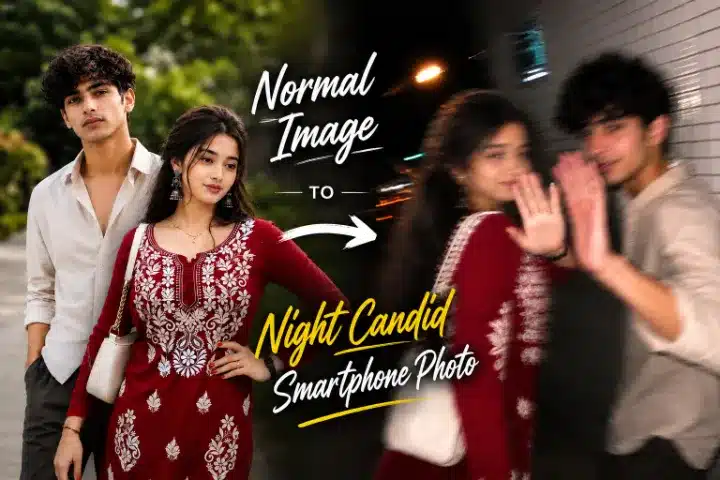
Artificial Intelligence (AI) image generation has evolved dramatically over the past few years. Modern AI models can
now create images that are almost impossible to distinguish from real photographs. Among the latest trends in AI-generated photography, Ultra-Realistic Candid Smartphone Photography has become one of the most popular styles. Instead of producing perfectly posed portraits with flawless lighting, this style recreates the imperfect beauty of real-life smartphone photos.
The prompt shared on this page is specifically designed to generate a raw, spontaneous, and realistic night-time smartphone photograph. Every line of the prompt works together to instruct the AI to create an image that feels authentic rather than artificial.
In this guide, you’ll learn how this prompt works, why each instruction is important, and how you can customize it to create your own unique AI images.
What Is This AI Prompt?
This prompt is an advanced photography prompt that tells an AI image generator to create a scene resembling a real smartphone snapshot captured unexpectedly at night.
Unlike traditional portrait prompts, this one intentionally avoids perfection. Instead, it focuses on:
- Natural human reactions
- Motion blur
- Camera shake
- Smartphone flash
- Imperfect framing
- Heavy image noise
- Authentic night photography
The result is an image that feels like a genuine memory captured in a split second.
Why This Prompt Looks So Real
Most AI-generated portraits appear overly polished because AI naturally prefers symmetry, clean lighting, and perfect focus.
This prompt deliberately does the opposite.
It instructs the AI to recreate the imperfections commonly found in real smartphone photography, including:
- Sudden movement
- Blurry facial details
- Overexposed flash lighting
- Crooked framing
- Visible image noise
- Random composition
These imperfections make the final image appear much more believable.
Understanding the Prompt Section by Section
1. Image Style
The prompt begins with:
Ultra-realistic candid smartphone photograph
This immediately tells the AI that the output should resemble a genuine mobile phone photograph rather than digital artwork or cinematic photography.
The addition of 9:16 Vertical ensures the generated image is perfectly suited for:
- Instagram Reels
- YouTube Shorts
- Facebook Stories
- WhatsApp Status
2. Reference Image Instructions
The prompt includes an important instruction:
Use the attached image only as inspiration.
This means the uploaded photo acts only as a visual reference.
The AI should:
- preserve the overall vibe,
- understand general facial proportions,
- maintain similar visual characteristics,
while ensuring the final subject remains completely original and non-identifiable.
This helps avoid creating an exact copy of a real person’s face while still maintaining a consistent visual style.
3. Scene Description
The setting plays a major role in realism.
The prompt places the subject on:
- a quiet Tokyo sidewalk,
- beside a white ceramic tile building,
- during nighttime.
These small environmental details help the AI build a believable setting with realistic lighting and reflections.
4. Natural Body Movement
Instead of standing still, the subject is walking.
The prompt requests:
- mid-step movement,
- turning back naturally,
- body continuing forward,
- spontaneous reaction.
This creates genuine body dynamics that resemble real street photography.
5. Facial Expression
Perfect smiles often make AI portraits look artificial.
Instead, this prompt asks for:
- slight embarrassment,
- shy grin,
- playful half smile,
- subtle reaction.
Because the expression lasts only a fraction of a second, the resulting image feels much more authentic.
6. Camera Behaviour
One of the strongest sections of this prompt focuses on how the photo is captured.
Instead of using a professional camera, it specifically requests:
- modern smartphone
- handheld shooting
- rushed capture
- uncontrolled camera shake
These details are essential because smartphone cameras behave very differently from DSLR cameras.
The AI therefore simulates the limitations of mobile photography.
7. Motion Blur
Motion blur is one of the biggest reasons this prompt appears realistic.
The prompt instructs the AI to blur:
- hair,
- raised hand,
- face,
- body movement.
Rather than producing a perfectly sharp portrait, the AI creates the impression that both the photographer and subject were moving simultaneously.
8. Flash Lighting
The lighting instructions intentionally avoid cinematic beauty lighting.
Instead, they recreate typical smartphone flash photography.
Characteristics include:
- harsh flash highlights,
- strong shadows,
- uneven exposure,
- bright skin reflections,
- dark surroundings.
This type of lighting is instantly recognizable because millions of smartphone photos are captured this way every day.
9. Background
The background is intentionally simple.
Instead of distracting scenery, the prompt uses:
- white ceramic tile walls,
- fading darkness,
- blurred street lights,
- streaked reflections.
This keeps attention focused on the subject while maintaining realism.
10. Overall Mood
Every great photograph tells a story.
This prompt creates the feeling that:
someone unexpectedly noticed the camera while walking.
The result feels:
- candid,
- personal,
- slightly awkward,
- playful,
- authentic.
Rather than looking staged, the image resembles a genuine moment frozen in time.
11. Image Quality
Surprisingly, the prompt intentionally asks for lower image quality.
It requests:
- visible noise,
- strong blur,
- raw smartphone processing,
- imperfect exposure.
Modern AI normally removes these flaws automatically.
By specifically requesting them, the final image becomes much more convincing.
12. Negative Prompt
The negative prompt tells the AI exactly what to avoid.
Examples include:
- Anime
- Illustration
- Painting
- Studio Lighting
- Beauty Portrait
- Sharp Face
- Perfect Focus
- Stylized Artwork
Removing these elements prevents the AI from drifting toward an artistic or unrealistic appearance.
Copy-Paste AI Prompt
Now that you understand how this AI prompt works, it is time for you to create ultra-realistic, smartphone-style images yourself. Choose the version that matches your subject and copy the prompt into your favourite AI image generator.
Tip: For the most realistic results, upload a high-quality reference image anduse theprompt without changing its core structure. You can later customise the location, clothing, lighting, or background to create unique variations.
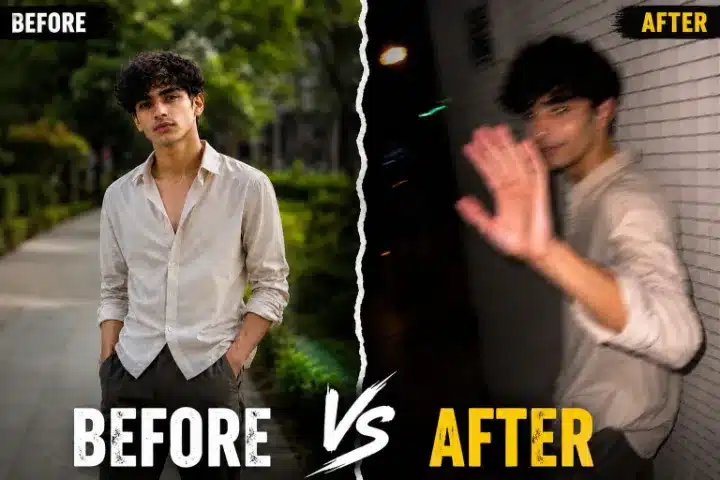
Male AI Prompt
Generate an ultra-realistic candid smartphone photograph using the Male Prompt provided below.
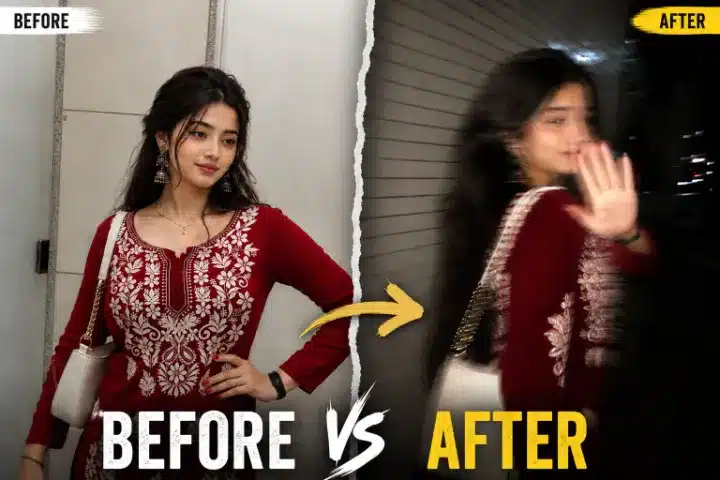
Female AI Prompt
Generate an ultra-realistic candid smartphone photograph using the Female Prompt provided below.
How to Use These Prompts
Using these prompts is simple, even if you're new to AI image generation.
- Copy either the Male or Female prompt based on your subject.
- Open your preferred AI image generator.
- Upload a suitable reference image if the platform supports it.
- Paste the prompt into the prompt box.
- Generate the image.
- If needed, make small adjustments to the location, outfit, expression, or lighting while keeping the main structure intact.
Which Prompt Should You Choose?
Choose the Male Prompt when generating images featuring a male subject, and the Female Prompt for female subjects. Both prompts follow the same cinematic smartphone photography style but are tailored to suit each subject naturally.
Pro Tips for Better Results
- Use a clear reference image for better consistency.
- Avoid changing too many instructions at once.
- Keep the motion blur and flash lighting sections unchanged for the most realistic smartphone effect.
- Experiment with different cities, outfits, and weather conditions while preserving the core prompt structure.
- Save your favourite variations so you can recreate similar images later.
Best AI Image Generators for This Prompt
This style works particularly well with modern AI image generation models that understand advanced photographic language.
Look for AI tools that support:
- reference image guidance,
- detailed photography prompts,
- realistic lighting simulation,
- motion blur rendering,
- smartphone photography styles.
Different AI models interpret prompts differently, so experimenting with multiple generators can help you achieve the most realistic results.
Who Should Use This Prompt?
This prompt is ideal for:
- AI artists
- Content creators
- Instagram creators
- Digital marketers
- Prompt engineers
- Social media influencers
- Graphic designers
- Photography enthusiasts
- AI photography hobbyists
Whether you're creating creative social media content or exploring realistic AI photography, this prompt provides an excellent starting point.
Final Thoughts
Ultra-realistic candid smartphone photography represents one of the most exciting trends in modern AI image generation. Instead of chasing perfection, this prompt embraces the natural imperfections that make real photographs memorable—motion blur, camera shake, harsh flash lighting, imperfect framing, and genuine human reactions.
By combining these elements, the AI can generate images that feel spontaneous, emotional, and surprisingly authentic. As AI technology continues to improve, understanding how each part of a prompt influences the final image becomes increasingly valuable.
If you're looking to create realistic night-time smartphone photos with a natural candid aesthetic, this prompt is an excellent example of advanced prompt engineering. Feel free to experiment with locations, gestures, lighting, and expressions while keeping the core structure intact. With a few thoughtful adjustments, you can create countless unique and lifelike AI-generated photographs.